Showing posts with label Document Management. Show all posts

Feb 3, 2012

Globally Reusable workFlows in Sharepoint 2010

In this article we will discuss about Globally Reusable workflows in SharePoint 2010.

there is new workflow in SharePoint 2010 i.e. Reusable workflow .This workflow will be developed based on content type which you select (All content Type),so it can be used in any list or library in a particular site.

If you want to use the Reusable workflow globally i.e. in all sites under one site collection you need work Globally reusable workflows.

open SharePoint designer 2010 ,open the site from designer ,click on workflows,
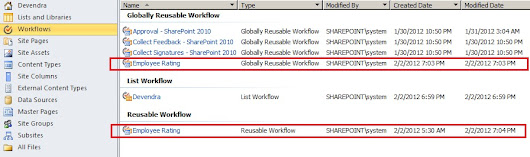
here i already created one reusable workflow i.e. Employee Rating:



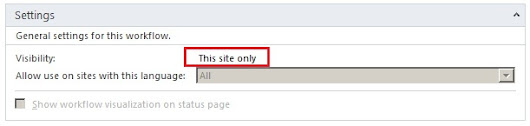
Click on that workflow and see the settings ,the visibility of this workflow is only to this site.


to make this one as globally reusable , from the ribbon control select Publish globally option.
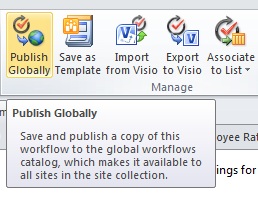


system will gives the below confirmation message.



Click on Ok.

Now see the Employee rating is under Globally reusable Workflow section.


Click on the Employee rating Globally reusable workflow , check the visibility , now it is changed from This Site Only to Global(All Subsites).
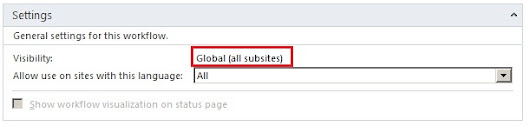


Now you can use this workflow in all Subsites under your site collection.
Hope you found this useful.

SharePoint-Journey for Administrators, Developers and users

Site WorkFlow in Sharepoint 2010 using Visual studio 2010

In This article we will discuss about site workflows.
Site work flow is not to a specific list or library you can run on any one of those.
In this example we will create a new Custom List Called Product List and take the data of existing Product List to the new Product list as a backup.
Prerequisite: Make sure that your site is having Product List.

Open visual studio.
Open File-- > New-- > project.
From SharePoint -- > 2010 -- > Select Sequential Workflow.
Give name as Site workflow.


Deploy as form solution.


Click Next.
Select Site workflow.
Give the workflow name which you like.


Click Next.


Click Next.
Here you can see only manually started option available.


Click Finish. It will show the below project structure.


If you want to change the URL of site to deploy, go to properties of the project (F4). Change the Site URL property.


Create Class1 from toolbox and drag and drop below onworkflowactivated.
Open the class1.cs file and paste the below code.

using System;
using System.Collections.Generic;
using System.Linq;
using System.Text;
using Microsoft.SharePoint;

namespace Product Backup
{
  public class Class1 : System.Workflow.ComponentModel.Activity
  {
      public Class1()
      { }

protected override System.Workflow.ComponentModel.ActivityExecutionStatus Execute(System.Workflow.ComponentModel.ActivityExecutionContext executionContext)
      {
          try
          {
              SPSite site = SPContext.Current.Site;
              SPWeb web = site.OpenWeb();
              SPList aList = web.GetList("/Lists/ Product s");
              try
              {
                  SPList bList = web.GetList("/Lists/ ProductsBackup");
                  bList.Delete();
              }
              catch
              { }
              Guid newAnnID = web.Lists.Add("ProductsBackup", "A backup Product s list.", SPListTemplateType.GenericList);
              SPList bakList = web.Lists[newAnnID];
            foreach (SPListItem item in aList.Items)
              {
                  SPListItem newAnnItem = bakList.Items.Add();
                  foreach (SPField field in aList.Fields)
                  {
                      if (!field.ReadOnlyField)
                          newAnnItem[field.Id] = item[field.Id];
                  }
                  newAnnItem.Update();
              }
              bakList.OnQuickLaunch = true;
              bakList.Update();
          }
          catch (Exception errx)
          {
            }
          return base.Execute(executionContext);
      }
  }
}

Build and deploy the solution.
Observe the output window.


Open the site URL and check, you will have a ProductsBackup list created with the Products List data.

Hope you found this useful.

SharePoint-Journey for Administrators, Developers and users

Jan 18, 2012

out of box workflows in sharepoint

Three-state workflow
This workflow having states like Active, Ready for Review,and Complete. This workflow can be customized and used in other lists or in custom SharePoint lists, and the names of the three states are configurable.

Approval workflow
This work flow can happen serial or parallel order.
Example: submitter submits the document, and the participants gets email alert.they may reject or approve the document and enter the reason.

Collect Feedback workflow
The Collect Feedback workflow gives submitter the ability to acquire feedback for their peers on the status of the submitted document. This workflow sends the document to the specified team members and contribute their feedback on the document. After it has circulated through the team, the feedback is compiled and the submitter is notified.

Collect Signatures workflow
An alternative to the Approval workflow where the approval process makes no
changes to the document, the Collect Signatures workflow will require each approver to place a digital signature on the document. After those signatures have been acquired through the workflow, you can take the document off line and the approval will still be recognizable. Note that this workflow can only be initiated from the Office Tools for building custom SharePoint workflows 15 client, such as Microsoft Office Word. It cannot be initiated from the browser like other workflows can.

Disposition Approval workflow
This workflow allows you to manage document expiration and retention. This enables you to decide what will happen to documents when they expire. A possible option,instead of deleting a document, is to archive it and send email notifications.

SharePoint-Journey for Administrators, Developers and users

workflows in Sharepoint 2010


Sharepoint workflows built on three different layers of windows workflow foundation services


what are the new things in workflows in Shareoint 2010.? we will discuss more on that..

there are two new workflows are introduced in Sharepoint 2010.

1.Reusable workflow
we can create reusable workflows and deploy them to the site or site collection level to be consumed by various objects within that scope.

Advantage:There is no need to maintain more than one copy of the same workflow.

2.Site Workflow
Site workflows more advanced of reusable workflows.
we can run site workflow on a list, library, or list item within a site.

Example:Entire site’s list items regardless of the list in which they reside, are can be manipulated like changing status,updating list Author etc...

SharePoint-Journey for Administrators, Developers and users